For analyst team leads
Your analysts spend the day assembling evidence. You spend yours checking it.
Throughput, consistency and QA all come back to the same 30 minutes per alert, most of it spent pulling records and writing up why something is fine. Assay does the pulling and the first draft, with a citation on every claim, so your team spends its time on judgment and you spend yours on the cases that need you.
What your week looks like now
A modeled team of 8. Modeled
Check the arithmetic against your own team. The 30-minute review time and 1,560 productive hours a year are the same assumptions used across this site. Sources and assumptions
| Line | How | Per week |
|---|---|---|
| L1 analysts | Inside the 2 to 25 range the Team plan is built for | 8 |
| Alerts per analyst per day | 6 productive hours at 30 minutes each | 12 |
| Alerts worked | 8 × 12 × 5 days | 480 |
| Analyst hours on alerts | 480 × 30 minutes | 240 |
| Closed, no escalation | 92% close rate, in line with 90%+ false positives1 | 442 |
| Closes to re-review for QA | A 10% sample, usually by you | 44 |
442 closes a week, each written up by hand, each one a place where two analysts can reach different answers. That is the consistency problem, and the burnout problem, in one number.
Jobs it does for you
What a team lead hires it for, and where each one lives in the product.
Clear the obvious closes faster without lowering the bar
The alert workspace opens with the evidence already pulled: customer profile, 90 days of transactions plus three years of history, prior alerts and SARs, and watchlist screening. The analyst reviews a cited rationale instead of building one. In a new workspace, payroll pattern and seasonal cash alerts start at batch approval; every other type starts at recommend.
Get two analysts to the same answer
The same policy rules run before and after the model on every alert, whoever opens it. Overriding the agent takes one of 6 reason codes, from “documented business purpose the agent did not weigh” to “analyst risk judgment”, so disagreements are countable instead of anecdotal.
Run QA without a spreadsheet
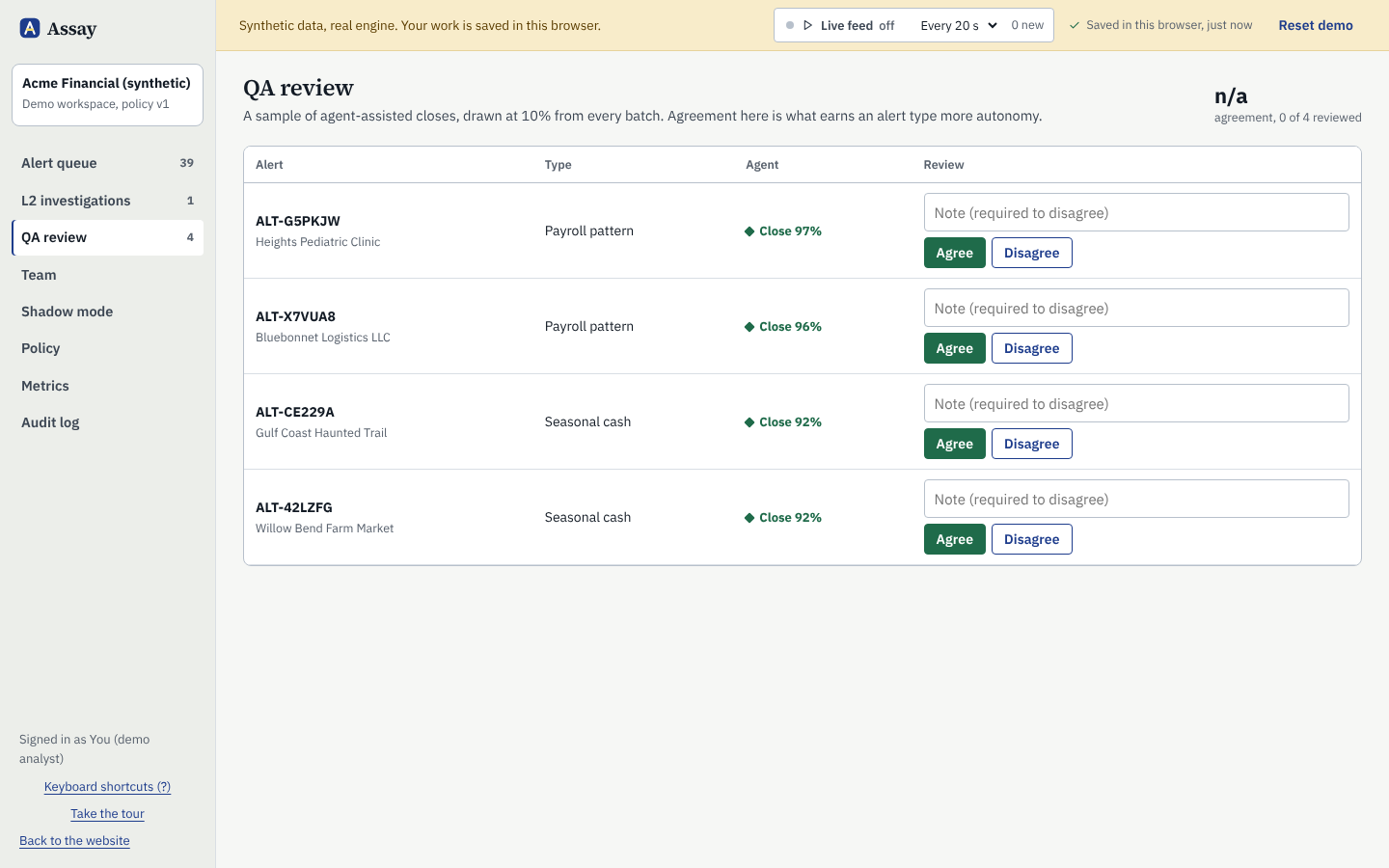
QA sampling draws 10% of agent-assisted closes by default, from every batch. A reviewer marks agree or disagree, a disagreement needs a written note, and agreement rolls up by alert type on the metrics screen. You change the rate in policy settings.
Teach new analysts on live alerts
Every recommendation carries its investigation trace: read the alert, read the profile, pull history, check prior cases, run typology checks, apply policy, assess. A new hire sees how a case is worked on every alert, and the override log shows where experienced analysts see it differently.
Balance the queue before it tips
Team workload shows each analyst's open alerts and their age against your internal deadline. The queue ranks open alerts by risk score and shows days left on each, so the one about to breach policy is easy to spot.
Take the noise off people
When a file is too thin to decide (fewer than 8 transactions in the lookback window), the agent abstains and says why instead of guessing. Memos that try to instruct the agent lock the alert for a human. Clean closes on eligible alert types go in a batch, not one at a time.
QA sampling
The QA sample draws itself.
Every batch of agent-assisted closes feeds a random sample to the QA queue. Reviewers see the recommendation, the citations and the analyst's decision side by side, and mark agree or disagree. Agreement by alert type is what earns that type more autonomy, and it is the number you will want in front of you when the BSA officer asks whether the tool is working.
- Sample rate set in policy, default 10%
- Agreement by alert type, and a reason code on every override
- Disagreements stay in the audit log with the reviewer's note
What Assay will not do for you
It drafts. It does not decide the calls that matter most.
Your analysts and investigators keep these, by design. The product has no setting to hand them over.
- Filing or deciding not to file a SAR
- Clearing a sanctions or watchlist match
- Contacting a customer about an alert
- Changing its own policy or thresholds
Work the queue the way your team would with Assay.
The demo runs in your browser on 44 synthetic alerts, with the queue, QA sampling and metrics. No sign-up.