For BSA officers
Your name is on every alert your team closes. You read almost none of them.
When an examiner asks why a run of structuring alerts closed with two-line notes, the answer should be a file, not a reconstruction. Assay gives every disposition a cited rationale, a named decision-maker and a tamper-evident record. The agent recommends. Your people decide.
What your week looks like now
Most of the queue is noise, and the clock still runs on the part that is not.
- of transaction-monitoring alerts are false positives at most banks 1
- 90%+
- to file once review finds the activity suspicious, or 60 with no suspect identified 2
- 30 days
- SARs filed by US institutions in fiscal 2025 3
- 4.8M
- modeled L1 labor per alert: 30 minutes at $57.69 an hour Modeled 4
- $28.85
Banks should document SAR decisions, including the specific reason for filing or not filing a SAR.
The risk in a BSA program is rarely the alert that got escalated. It is the backlog that aged past your own policy, and the closes nobody can explain a year later because the reasoning lived in an analyst's head.
A modeled team of six L1 analysts working 12 alerts a day each clears 360 alerts a week, about 180 analyst hours. At a 90% false positive rate, more than 320 of those are closes, and each one is a decision someone may ask you to defend. Modeled
Jobs it does for you
Six things a BSA officer needs, and the screen that does each one.
Show why every alert closed, months later
The alert workspace shows a cited rationale for each recommendation: every claim links to the transaction, KYC record, prior case or watchlist entry behind it. Citations and dollar figures are checked against the records before the analyst sees them, and a claim that cites nothing sends the alert to human review.
Keep the SAR clock where the regulation puts it
The L2 investigation view starts the SAR clock only when an investigator records a suspicion determination, then counts 30 days, or 60 when no suspect is identified. The queue shows your internal review deadline (default 30 days) separately, so nobody confuses the two.
See the backlog before an examiner does
The queue ranks open alerts by risk score and shows days left against your internal deadline on every one. Team workload shows open alerts and their age per analyst, so a growing pile is visible in week one, not at the next exam.
Decide how much the agent may do, alert type by alert type
The autonomy ladder in policy settings runs from L0 shadow to L3 auto-close per typology. Moving a type to auto-close takes an owner or admin attesting to 98% agreement on 2,000 QA-reviewed alerts and written approval. Only owners and admins can change policy, and each change gets a version number.
Set how much no-SAR rationale to keep
FinCEN's October 2025 FAQ says there is no requirement to document a decision not to file; the FFIEC manual still says banks should.5 Policy settings let you choose full or standard depth. The default is full, and because the agent writes the rationale anyway, the cost is storage, not analyst time.
Hand the examiner a file, not a reconstruction
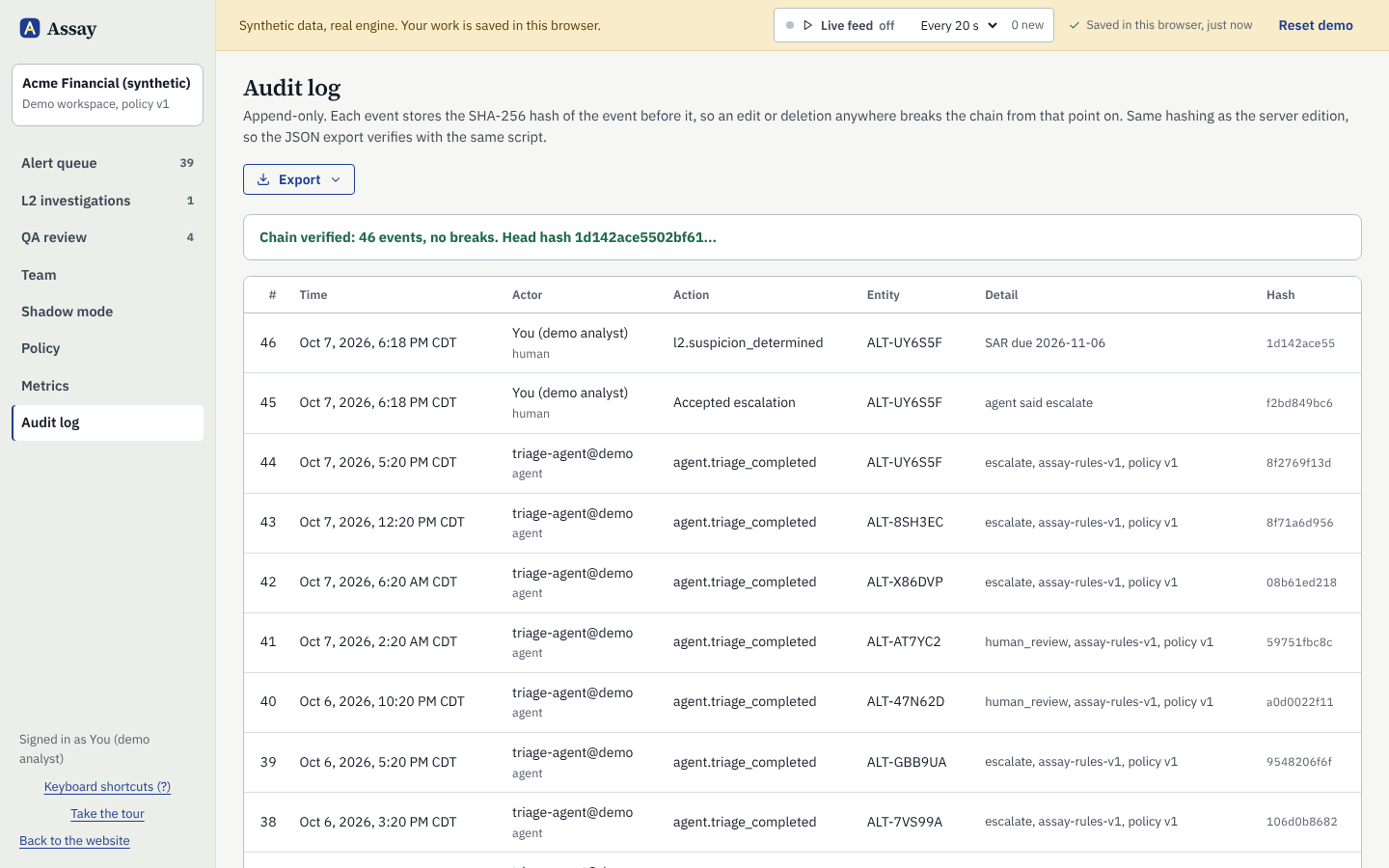
The audit log export gives every run, decision and policy change as CSV or JSON, with the model and policy version on each entry. The log is a SHA-256 hash chain, re-verified each time it is viewed, so an edit or deletion anywhere shows up.
Audit log
One log, chained, exportable.
Each entry records who acted, human or agent, what they did, and the model and policy version in force. Each row's hash covers the one before it, so changing any past entry breaks every hash after it. The workbench re-checks the chain every time the log is opened.
- Agent runs, with the claims, citations and policy rules that fired
- Human decisions, with a reason code on every override
- Policy changes, with before and after values
- Export as CSV or JSON for the exam file
What Assay will not do for you
The decisions with your name on them stay with people.
These are not settings someone can switch on later. The code has no path for the agent to take them, and a SAR decision can only be recorded by a signed-in person.
- Filing or deciding not to file a SAR
- Clearing a sanctions or watchlist match
- Contacting a customer about an alert
- Changing its own policy or thresholds
See a structuring alert go from rule hit to cited escalation.
The demo runs in your browser on 44 synthetic alerts. Open the first one and check every citation against the records yourself.